Zero-Day Malware: Meaning, Definition and Real-World Impact
Zero-day malware exploits unknown software flaws before vendors can patch them, leaving traditional signature detection entirely blind to the threat until it executes.
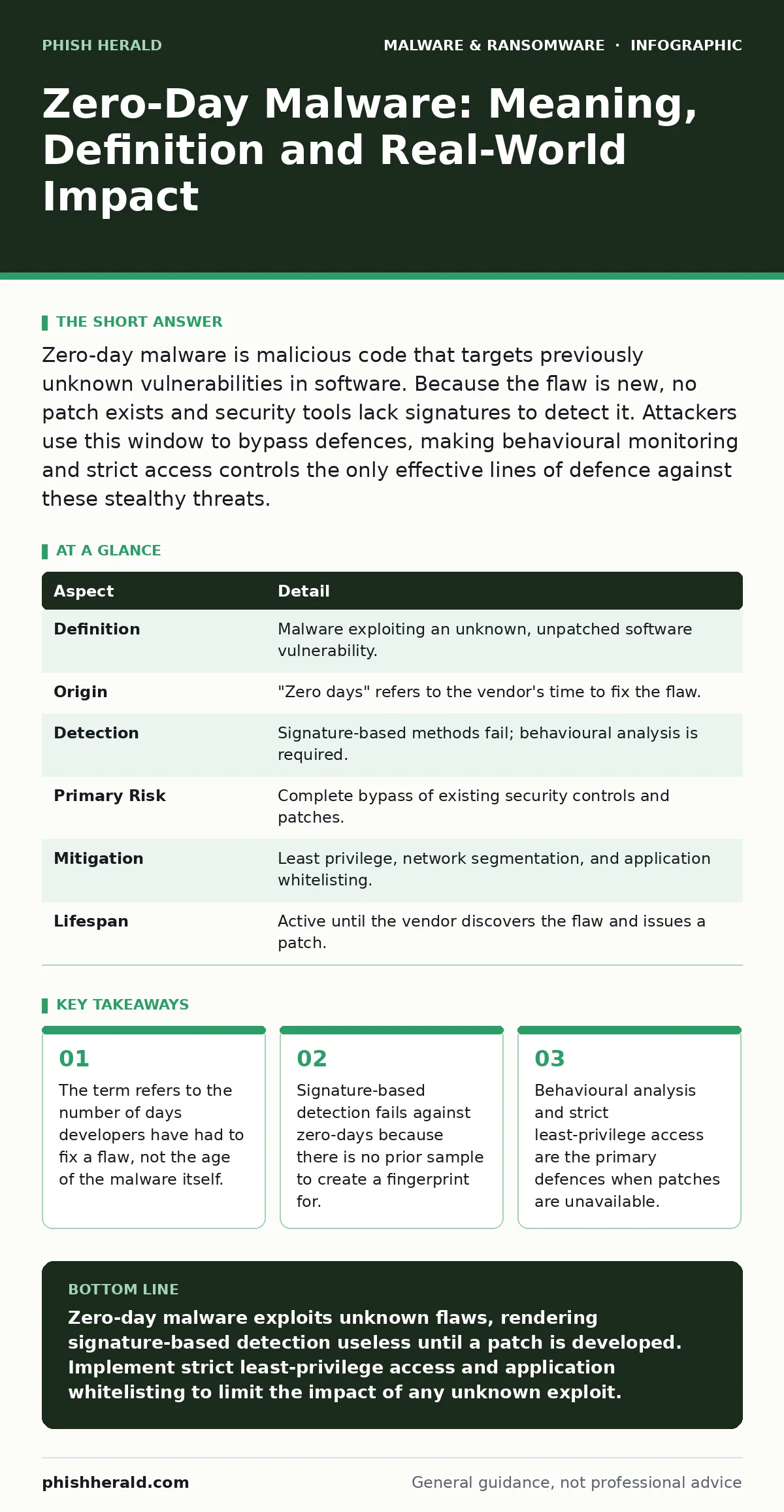
Zero-day malware is malicious code that targets previously unknown vulnerabilities in software. Because the flaw is new, no patch exists and security tools lack signatures to detect it. Attackers use this window to bypass defences, making behavioural monitoring and strict access controls the only effective lines of defence against these stealthy threats.
Understanding the Core Mechanism of Zero-Day Malware
Zero-day malware is malicious software that exploits a vulnerability in an application or operating system that the vendor does not yet know about. The term zero-day refers to the fact that the software creator has had zero days to develop and distribute a patch for the security flaw. This creates a dangerous window where the vulnerability exists in the wild, and attackers can use it freely. You cannot prevent this type of attack by updating your systems, because the update simply does not exist yet.
The malware succeeds because it performs actions that the software allows, but should not. It tricks the system into accepting malicious input as valid data. This bypasses standard security checks that rely on known patterns. The result is unauthorized access, data theft, or system compromise. You must understand that this is not a failure of your security tools, but a fundamental gap in the software’s design that has never been identified.
| Aspect | Detail |
|---|---|
| Definition | Malware exploiting an unknown, unpatched software vulnerability. |
| Origin | "Zero days" refers to the vendor's time to fix the flaw. |
| Detection | Signature-based methods fail; behavioural analysis is required. |
| Primary Risk | Complete bypass of existing security controls and patches. |
| Mitigation | Least privilege, network segmentation, and application whitelisting. |
| Lifespan | Active until the vendor discovers the flaw and issues a patch. |
Where the Term Originates in Practice
The phrase comes from the software development lifecycle. When a security researcher or attacker discovers a new flaw, they notify the vendor. If the vendor is unaware, the count starts at zero. In practice, this term often describes the moment a vulnerability is exploited in the wild. Attackers race to use the flaw before the vendor can respond. This race creates a high-stakes environment. The malware is effective because it is novel. Security researchers have no reference sample to analyse.
You cannot create a rule to block something you have never seen. This is why zero-day is a temporal concept. It describes the state of the vulnerability, not the code itself. Once a patch is released, the vulnerability is no longer zero-day, even if the malware remains dangerous. The term shifts from describing an unknown flaw to a known one. This distinction matters for your incident response planning. You must treat unknown exploits differently from known ones.
How Attackers Use Zero-Days Day to Day
Attackers do not always use zero-days for massive, public breaches. They often use them for targeted access. Imagine a scenario where an attacker needs to enter a specific server to plant a rootkit. The rootkit hides deep in the system, evading standard scans. The zero-day exploit provides the initial entry point. Once inside, the attacker may switch to known malware. This makes the initial compromise hard to trace. You might see normal traffic, but the system is already compromised.
Attackers also use zero-days to bypass sandboxing. Sandboxes simulate an environment to test suspicious files. If the exploit targets the sandbox software itself, the malware escapes detection. This is a sophisticated tactic. It requires significant resources. Therefore, you should assume that high-value targets are subject to these advanced techniques. Regular updates are not enough. You need layers of defence that do not rely on knowing the threat.
Why Traditional Detection Methods Fail
Signature-based detection relies on matching file hashes or code patterns against a database of known threats. This method is efficient for common malware. It fails completely against zero-days. There is no signature to match. The code is new. It has never been seen before. This is the fundamental limitation of reactive security. You are always one step behind. This is why heuristic detection is necessary. Heuristics look for suspicious behaviour rather than specific code.
They ask questions like "Is this program trying to modify system files?" or "Is this process communicating with an unknown server?" These questions apply to new threats. However, heuristics can produce false positives. Legitimate software may behave strangely. You must balance sensitivity with accuracy. Tuning these systems is complex. It requires constant adjustment. You cannot set them and forget them. The goal is to catch the abnormal, not the unknown.
What People Usually Get Wrong
Many believe that being offline protects against zero-days. This is incorrect. Zero-day exploits can exist in offline systems. If you move a file from an offline device to an online one, the exploit executes. The vulnerability is in the software, not the network connection. Another common mistake is assuming that all malware is a zero-day. Most malware uses known vulnerabilities. Attackers prefer ease over novelty. Zero-days are expensive and rare.
They are reserved for high-value targets. Do not panic over every unknown alert. Most are false positives. However, do not ignore alerts from critical systems. Validate them carefully. Use malware analysis techniques to understand the behaviour. Do not rely on a single tool. Layer your defences. This reduces the chance of a single failure causing a breach. Understanding the rarity of true zero-days helps you prioritize your resources.
See also: What Is Cache Poisoning: How It Works and How to Stop It · Zero-Click Attacks: Dispel Myths and Secure Your Infrastructure
Defending Against the Unknown
You cannot patch what you do not know. Therefore, you must limit the damage. Least privilege is your best defence. Give users and processes only the permissions they need. If a zero-day exploit runs, it inherits the permissions of the user. If that user has no admin rights, the attacker cannot install persistent malware. Network segmentation also helps. Isolate critical systems. If one segment is compromised, the attacker cannot move laterally.
Application whitelisting allows only approved software to run. This blocks unknown executables. Even if an exploit runs, it cannot launch a new program. This is a powerful control. It shifts the burden from detection to prevention. You do not need to know the threat. You only need to know what is allowed. This approach is difficult to implement but highly effective. It reduces the attack surface significantly.
The Role of Advanced Analysis
When a suspicious event occurs, you must analyse it. Malware analysis helps you understand the threat. You can determine if it is a zero-day or a known variant. Static analysis examines the code without running it. Dynamic analysis runs the code in a controlled environment. This reveals the behaviour. You can see what files it modifies and what connections it makes. This information helps you create detection rules.
It also helps you understand the scope of the breach. If you find a zero-day, you must report it to the vendor. This helps everyone. It shortens the window of exposure. Collaboration is key. Sharing threat intelligence helps others defend themselves. Do not keep findings secret. The security community relies on transparency. Your analysis contributes to the collective defence. This makes the overall ecosystem safer.
Related Threats to Consider
Zero-day malware is not the only threat. Attackers often use malicious PyPI packages to deliver payloads. These packages appear legitimate but contain hidden exploits. Developers may install them unknowingly. This is a supply chain attack. It bypasses many traditional checks. You must verify the source of every package. Another related threat is ransomware. While ransomware often uses known exploits, it can also use zero-days for initial access.
The ransom notes left behind are not the main issue. The encryption is. Focus on backups and recovery. Remote access tool abuse is also common. Attackers use legitimate tools to maintain access. This can look like normal activity. You must monitor for unusual usage patterns. Understanding these related threats helps you build a holistic defence. Do not focus on one area. Security is a system of interconnected controls.
Key takeaways
- The term refers to the number of days developers have had to fix a flaw, not the age of the malware itself.
- Signature-based detection fails against zero-days because there is no prior sample to create a fingerprint for.
- Behavioural analysis and strict least-privilege access are the primary defences when patches are unavailable.
Zero-day malware exploits unknown flaws, rendering signature-based detection useless until a patch is developed. Implement strict least-privilege access and application whitelisting to limit the impact of any unknown exploit.
Frequently asked questions
How long does a zero-day vulnerability remain active?
The duration varies widely. It depends on how quickly the vendor discovers the flaw and releases a patch. Some vulnerabilities remain unpatched for years. Others are fixed within days. The window of risk is unpredictable.
Can antivirus software detect zero-day malware?
Traditional antivirus using signatures cannot detect zero-days. However, modern solutions with behavioural analysis and heuristics may detect suspicious activity. These methods are not foolproof. They rely on identifying patterns of abuse rather than specific code.
Is zero-day malware the same as a zero-day exploit?
No. The exploit is the code or technique used to take advantage of the vulnerability. The malware is the payload delivered by the exploit. The exploit opens the door. The malware enters and causes damage. They are distinct components of the attack.
How do I know if I have been hit by a zero-day?
You may not know immediately. Look for unusual system behaviour, unexpected network traffic, or new files. If you suspect a breach, isolate the system. Perform a thorough forensic analysis. Check for persistence mechanisms. Assume the worst until proven otherwise.
How this guide was produced: written by the Phish Herald editorial team with AI assistance, checked against the public references listed below, and reviewed when the facts change. See our editorial policy or report an error.