Rootkits Explained: How Hidden Code Persists on Your System
Rootkits hide by intercepting system calls, making standard security tools blind to their presence and allowing silent data exfiltration.
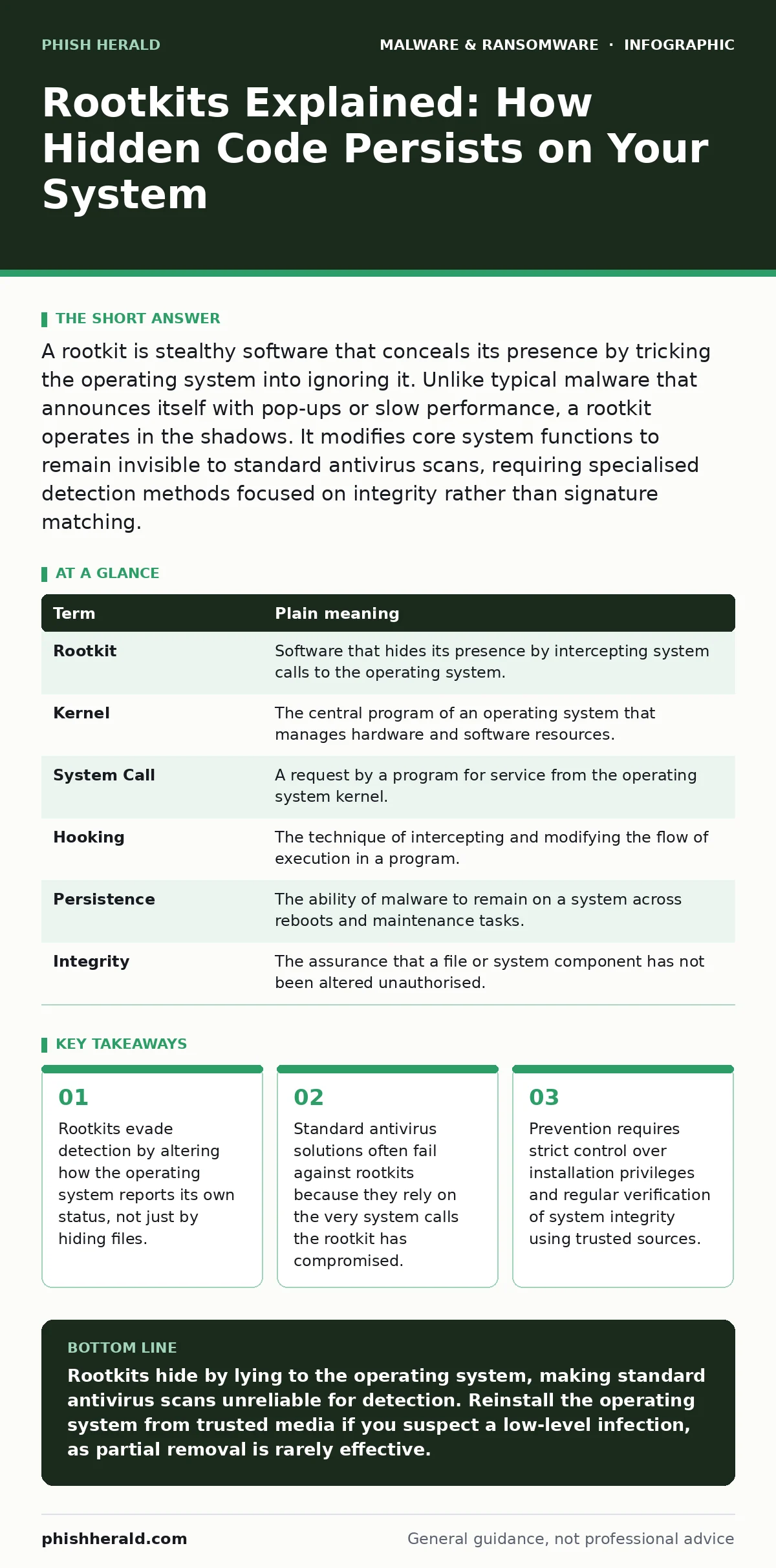
A rootkit is stealthy software that conceals its presence by tricking the operating system into ignoring it. Unlike typical malware that announces itself with pop-ups or slow performance, a rootkit operates in the shadows. It modifies core system functions to remain invisible to standard antivirus scans, requiring specialised detection methods focused on integrity rather than signature matching.
The Janitor Who Rewrites the Ledger
Imagine a library where a mischievous janitor gains access to the cataloguing system. Instead of stealing books directly, this janitor edits the digital records. When a librarian asks if a specific book exists, the system says "no," even though the book sits plainly on the shelf. The janitor has not removed the evidence; they have corrupted the mechanism used to verify the evidence.
This is the fundamental mechanic of a rootkit. It is a collection of software tools that enables unauthorised access to a computer or its resources. The "root" refers to the highest level of administrative control, while "kit" implies a suite of tools. The goal is not just entry, but concealment. The attacker wants to stay inside without triggering alarms.
How the Illusion Works
Most malware tries to hide by encrypting its files or burying them in obscure folders. A rootkit takes a different approach. It hooks into the operating system’s kernel. The kernel is the core component that manages system resources and hardware interactions. By modifying the kernel, the rootkit changes the answers the system gives to security software.
When an antivirus program scans for malicious files, it asks the operating system, "What files are in this directory?" If a rootkit is active, it intercepts that question. It returns a list of files that excludes the malicious code. The antivirus sees a clean directory because the operating system has been lied to. This is why signature-based detection often fails. The scanner is looking for a needle in a haystack, but the rootkit has convinced the scanner that the haystack does not exist.
The Cost of Invisible Access
For an ordinary user, the immediate signs of infection are often absent. There are no ransom notes demanding payment, unlike in double extortion ransomware scenarios where data is encrypted and threatened for leak. There are no sudden pop-ups. Instead, you might notice subtle anomalies. Internet speeds may fluctuate unpredictably as data is siphoned out in the background. Applications might crash more frequently due to memory conflicts with the hidden code.
The danger lies in the persistence. Because the rootkit operates at a low level, it survives reboots. Standard removal tools cannot delete files they cannot see. This makes manual cleanup nearly impossible for users without advanced forensic skills. The system is compromised, and the attacker has a permanent foothold. This persistent access is more dangerous than a one-time data theft because it allows for long-term espionage or the staging of further attacks, such as the abuse of remote access tool abuse techniques.
Mini Glossary
| Term | Plain meaning |
|---|---|
| Rootkit | Software that hides its presence by intercepting system calls to the operating system. |
| Kernel | The central program of an operating system that manages hardware and software resources. |
| System Call | A request by a program for service from the operating system kernel. |
| Hooking | The technique of intercepting and modifying the flow of execution in a program. |
| Persistence | The ability of malware to remain on a system across reboots and maintenance tasks. |
| Integrity | The assurance that a file or system component has not been altered unauthorised. |
Why Standard Advice Falls Short
You might think that keeping your antivirus updated is enough. It is not. Antivirus engines rely on the operating system to tell them what is happening. If the rootkit has compromised the operating system’s truth, the antivirus is flying blind. This is a non-obvious consequence of privilege escalation. When malware gains administrative rights, it can rewrite the rules of engagement.
Another common misconception is that offline backups solve everything. While offline backups protect your data from encryption, they do not protect your system’s integrity. If you restore a clean backup onto a system with a kernel-level rootkit, the rootkit can reinfect the new files. The infection lives in the firmware or the boot process, not just the data files.
See also: Account Takeover Fraud Detection: Signals That Beat Automated Attacks
Simple Safety Habits
Preventing rootkit infection requires shifting from reactive scanning to proactive control. You must assume that any software installed with high privileges could be a vector. This applies to free utilities, pirated games, and even well-intentioned scripts. Malware in pirated software is a common entry point, but so is poorly vetted open-source code.
- Limit administrative privileges. Use a standard user account for daily tasks. Only elevate to administrator when installing trusted software. This prevents accidental or malicious installation of low-level drivers.
- Enable Secure Boot. This feature ensures that only signed and trusted code runs during the startup process. It prevents many bootkits, a type of rootkit that loads before the operating system, from executing.
- Verify software sources. Download applications only from official vendor websites or verified app stores. Avoid third-party download portals that bundle installers. Check digital signatures where available to confirm the file has not been tampered with.
The Path to Recovery
If you confirm a rootkit infection, the most reliable solution is a full system wipe. This means formatting the hard drive and reinstalling the operating system from original media. Partial removal is risky because you cannot be certain you have removed all hooks. The hidden cost of a rootkit is not just the initial intrusion, but the erosion of trust in your system’s reported state.
Consider this scenario: Imagine you remove the visible malicious files. The system seems normal. However, a residual hook remains in the kernel. Months later, when you install a critical security update, the hook intercepts the installation and blocks it. Your system is left vulnerable, not because the update failed, but because the underlying truth was still corrupted. This is why thoroughness matters more than speed.
Building a Resilient Foundation
To protect against these stealthy threats, integrate security into your routine, not just your software stack. Regularly update your operating system to patch kernel vulnerabilities. Use application whitelisting if you manage a fleet of devices, which allows only approved programs to run. For personal devices, be sceptical of any software that demands administrator rights without a clear, necessary reason.
Understanding that visibility does not equal safety is the first step. A clean scan is a necessary condition for safety, but it is not a sufficient one. By controlling what enters your system and verifying its integrity, you reduce the surface area for rootkit deployment. This mindset shifts the burden from detection to prevention, which is the only effective strategy against tools designed to be unseen.
Key takeaways
- Rootkits evade detection by altering how the operating system reports its own status, not just by hiding files.
- Standard antivirus solutions often fail against rootkits because they rely on the very system calls the rootkit has compromised.
- Prevention requires strict control over installation privileges and regular verification of system integrity using trusted sources.
Rootkits hide by lying to the operating system, making standard antivirus scans unreliable for detection. Reinstall the operating system from trusted media if you suspect a low-level infection, as partial removal is rarely effective.
Frequently asked questions
Can a rootkit infect my mobile phone?
Yes, Android and iOS devices can be infected by rootkits, though iOS’s closed ecosystem makes it harder. Android devices are more vulnerable if they are rooted or if users install apps from unverified sources.
How do I know if I have a rootkit?
Look for unexplained system slowdowns, unusual network traffic, or files that disappear and reappear. specialised rootkit scanners boot from external media to bypass the compromised operating system and detect hidden code.
Does disabling internet access stop a rootkit?
It stops the rootkit from communicating with its controller, but it does not remove the malware. The code remains on the device and can reactivate once connectivity is restored.
Can a rootkit steal my passwords?
Yes, keylogging rootkits can record every keystroke you make, including passwords and banking details, and send them to the attacker without you noticing.
How this guide was produced: written by the Phish Herald editorial team with AI assistance, checked against the public references listed below, and reviewed when the facts change. See our editorial policy or report an error.