Public File Share Exposure: Debunking Six Common Security Myths
Visibility controls do not equal security, and internal permissions often fail when storage moves to public cloud infrastructure without reconfiguration.

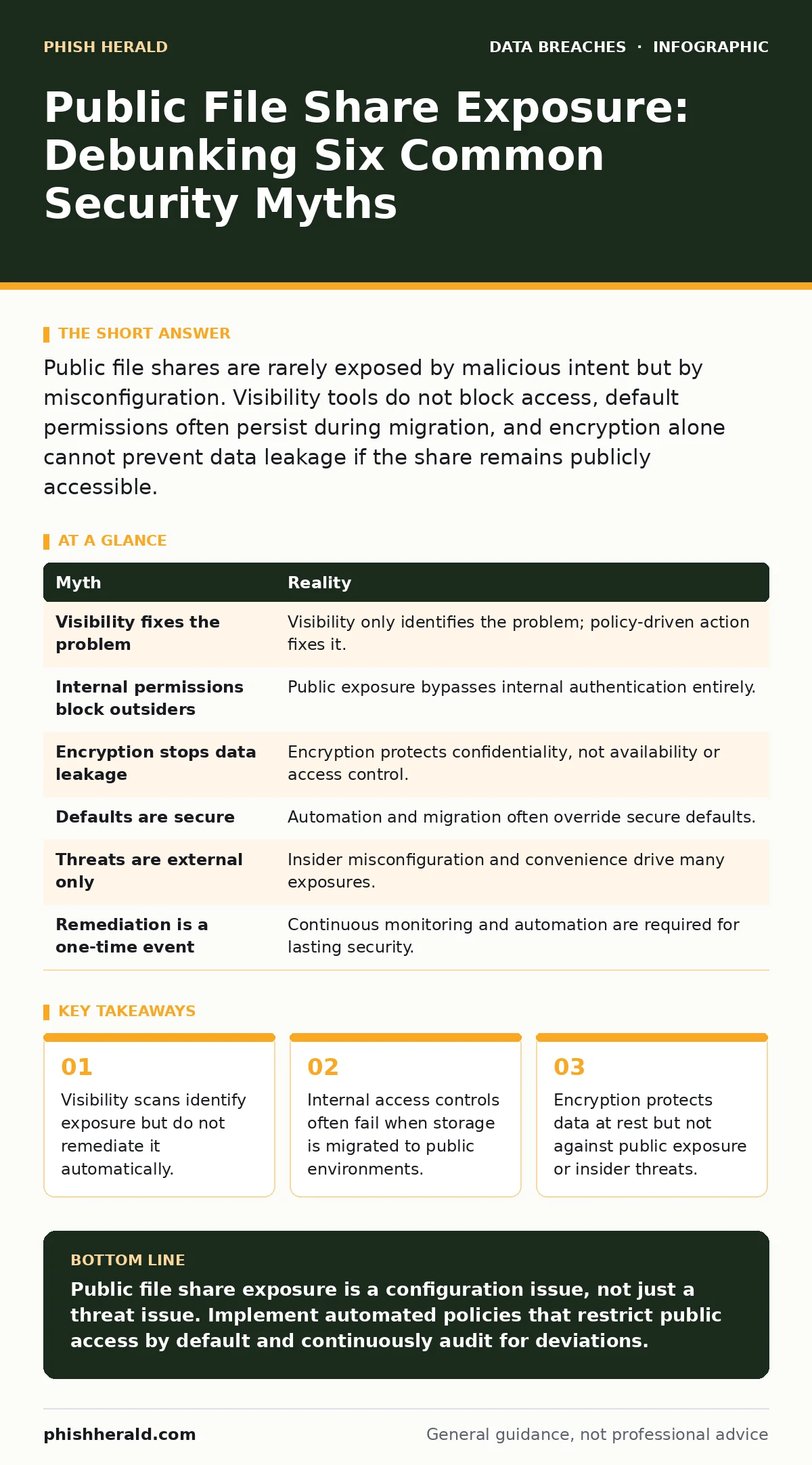
Public file shares are rarely exposed by malicious intent but by misconfiguration. Visibility tools do not block access, default permissions often persist during migration, and encryption alone cannot prevent data leakage if the share remains publicly accessible.
Myth: If We Can See It, It Is Fixed
Reality: Visibility is a diagnostic step, not a remediation action. Many teams assume that running a scan for exposed data automatically closes the gap, but detection merely confirms the presence of a risk. A scanner can list every public folder in your environment, yet it cannot decide whether that folder contains critical intellectual property or a marketing brochure.
You must define the policy before the tool can act. Without a pre-approved rule set, the system cannot safely delete or restrict access to shared resources. Imagine a scanner flagging a folder used by the finance team for weekly reporting. If the tool blocks access immediately, it halts business operations. If it leaves it open, the data remains exposed. The gap between seeing the problem and solving it is where the breach occurs.
Myth: Internal Permissions Prevent Public Access
Reality: Storage permissions and network permissions are distinct layers that often desynchronise. You might have strict access controls within your corporate network, limiting who can view a file share. However, if that share is exposed to the internet via a misconfigured gateway or cloud bucket, those internal rules become irrelevant to external actors. The public internet does not respect your internal Active Directory groups.
An outsider does not need to authenticate to your domain to read a publicly accessible object. They only need the direct URL. This is a common failure point during digital transformation. As organisations move data to cloud storage, the original internal permission sets are often not translated to the new environment’s access control lists. The data sits behind a door that looks locked from the inside but has no lock from the outside.
Myth: Encryption Eliminates Exposure Risk
Reality: Encryption protects data confidentiality at rest and in transit, but it does not control availability. If a public file share is exposed, the data is accessible to anyone with the link, regardless of whether the files are encrypted on the disk. Encryption prevents an attacker from stealing a hard drive and reading the contents offline. It does not stop an attacker from accessing the live service and copying the data in its usable form.
Furthermore, if the encryption keys are stored in the same environment or managed by the same identity provider, a compromise of the management layer can render the encryption moot. You must treat encryption as one layer of defence, not a substitute for access control. This principle applies equally to full disk encryption on laptops and to server-side encryption in cloud storage. Both protect against physical theft, neither against logical exposure.
Myth: Default Settings Are Secure by Design
Reality: Most cloud storage services default to private access, but this safety net is fragile and easily overridden. During migration or automation, scripts often create new storage containers with default templates. If those templates are not explicitly hardened, the new containers may inherit overly permissive settings. A common error is setting the bucket policy to allow public read access for ease of integration with a web application.
This convenience exposes the entire container to the internet. The assumption that "private" is the default holds true only for manual creation by careful administrators. Automated processes and rapid scaling often bypass these careful checks. You must audit automation scripts and infrastructure-as-code templates to ensure they enforce least privilege. Relying on the vendor’s default is a passive strategy that fails under velocity.
Myth: Only External Threats Matter
Reality: Insider threats and misconfiguration by well-meaning staff are frequent causes of exposure. An employee may create a public share to collaborate with a partner, believing the partner’s organisation is secure. They do not intend to leak data, but they bypass the secure file transfer protocol for convenience. This human factor is often harder to manage than external hacking.
The attacker does not need to break in; they only need to wait for you to open the door. This dynamic is similar to third-party data breaches, where the vulnerability lies not in your core infrastructure but in the connections you make with others. Even with strict external firewalls, a single employee can create a direct path to sensitive data. Training must focus on the consequences of convenience, not just the mechanics of phishing.
See also: Stop Exposed Storage Buckets: 3 Cloud Security Fixes That Work · Cloud Data Exfiltration: 6 Myths That Leave Your Assets Vulnerable
Myth: Remediation Is a One-Time Task
Reality: Public exposure is a continuous state that requires constant management. New shares are created daily by developers, analysts, and administrators. A scan that clears the board today may find new violations tomorrow. Static security measures degrade as the environment changes. You need a loop that detects, assesses, and remediates continuously. This requires integration with your identity and access management systems.
When a user leaves the organisation, their shared folders must be reviewed and restricted. When a project ends, its temporary shares must be deleted or archived. This ongoing process is akin to file integrity monitoring, where the goal is not just to detect change but to respond to unauthorised modifications in real time. Without automation, the backlog of exposed shares will outpace your team’s ability to close them.
Summary of Myths and Realities
| Myth | Reality |
|---|---|
| Visibility fixes the problem | Visibility only identifies the problem; policy-driven action fixes it. |
| Internal permissions block outsiders | Public exposure bypasses internal authentication entirely. |
| Encryption stops data leakage | Encryption protects confidentiality, not availability or access control. |
| Defaults are secure | Automation and migration often override secure defaults. |
| Threats are external only | Insider misconfiguration and convenience drive many exposures. |
| Remediation is a one-time event | Continuous monitoring and automation are required for lasting security. |
Key takeaways
- Visibility scans identify exposure but do not remediate it automatically.
- Internal access controls often fail when storage is migrated to public environments.
- Encryption protects data at rest but not against public exposure or insider threats.
- Default permissions in cloud storage buckets frequently allow anonymous read access.
Public file share exposure is a configuration issue, not just a threat issue. Implement automated policies that restrict public access by default and continuously audit for deviations.
Frequently asked questions
How do I find exposed public file shares?
Use cloud security posture management tools or native cloud audit logs to scan for storage objects with public read or write permissions enabled.
Can I use firewalls to block public file shares?
Firewalls can block traffic to known malicious IPs, but they cannot easily distinguish between legitimate public access and unauthorised exposure without deep packet inspection and application-layer rules.
What is the difference between a public share and a shared link?
A public share exposes the entire folder or bucket to anyone on the internet, while a shared link grants access only to those who possess the specific URL, though the URL can still be guessed or leaked.
Does multi-factor authentication help with public shares?
MFA protects user accounts, but if a file share is publicly accessible without authentication, MFA provides no protection against anonymous access.
How this guide was produced: written by the Phish Herald editorial team with AI assistance, checked against the public references listed below, and reviewed when the facts change. See our editorial policy or report an error.