Detect Potentially Unwanted Programs: Signals, Logs and Blind Spots
Potentially unwanted programs often evade detection by masquerading as legitimate utilities, leaving subtle behavioural traces rather than obvious signatures in system logs.
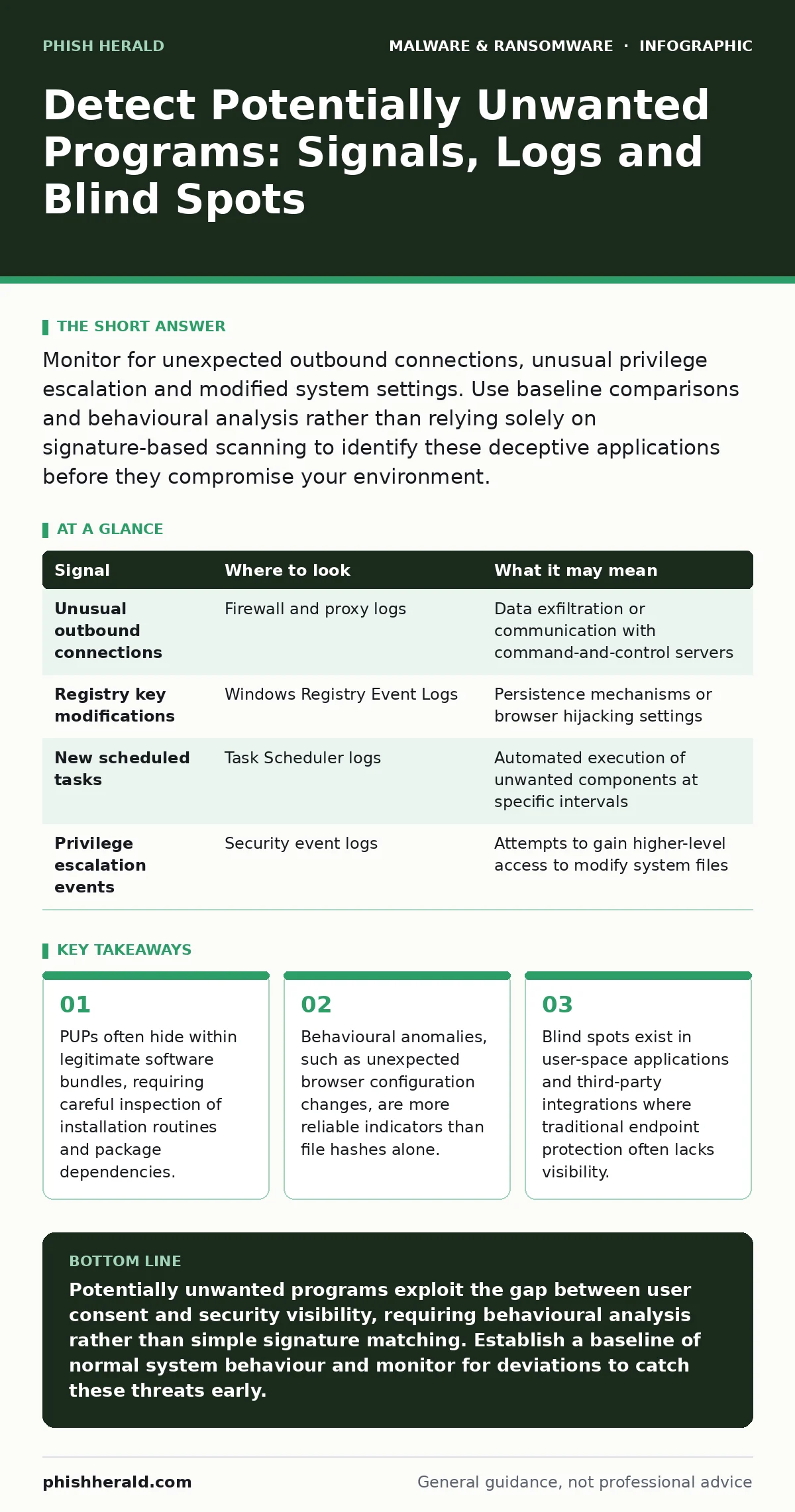
Monitor for unexpected outbound connections, unusual privilege escalation and modified system settings. Use baseline comparisons and behavioural analysis rather than relying solely on signature-based scanning to identify these deceptive applications before they compromise your environment.
The Nature of the Threat
Potentially unwanted programs, often abbreviated as PUPs, sit in a grey area between legitimate software and malware. They install with some form of user consent, usually buried in end-user licence agreements or bundled with free applications. This consent mechanism allows them to bypass many standard security controls that rely on detecting malicious intent.
Unlike outright malware, PUPs may not destroy data or encrypt files. Instead, they degrade performance, harvest data or alter system settings to serve advertising or tracking purposes. Understanding this distinction is vital for tuning your detection methods. You are not looking for a virus; you are looking for behaviour that violates the principle of least privilege.
Signals in System Logs
System logs provide a historical record of activity that can reveal the presence of unwanted software. Focus on event logs that track process creation, registry modifications and service installations. Look for processes that launch at startup but are not part of the core operating system or approved application suite. Pay attention to the command-line arguments used during execution. A legitimate browser launcher might have simple arguments, whereas a PUP often includes complex strings related to tracking IDs or affiliate codes. These details are often overlooked in routine log reviews because they appear benign at a glance.
| Signal | Where to look | What it may mean |
|---|---|---|
| Unusual outbound connections | Firewall and proxy logs | Data exfiltration or communication with command-and-control servers |
| Registry key modifications | Windows Registry Event Logs | Persistence mechanisms or browser hijacking settings |
| New scheduled tasks | Task Scheduler logs | Automated execution of unwanted components at specific intervals |
| Privilege escalation events | Security event logs | Attempts to gain higher-level access to modify system files |
Behavioural Anomalies in Endpoints
Behavioural analysis is more effective than signature-based detection for identifying PUPs. These programs often change system behaviour in subtle ways that impact user experience. Monitor for unexpected changes to default search engines, home pages or new tab actions in web browsers. These changes are common tactics used by PUPs to generate ad revenue. Also, watch for the injection of additional toolbars or extensions into browsers. These extensions often have broad permissions that allow them to read and modify all data on websites you visit. Such permissions are rarely necessary for basic functionality and are a strong indicator of unwanted software.
Installation and Package Dependencies
Many PUPs enter the environment through software bundling. Users installing free applications often inadvertently agree to install additional software. This is particularly common with media players, download managers and utility tools. Inspect the installation logs of these applications for secondary components. Look for installers that launch multiple executable files in sequence.
Each additional executable represents a potential vector for unwanted software. Furthermore, examine package dependencies in development environments. A seemingly harmless library may depend on a package that includes tracking code. This supply chain risk is often missed because security teams focus on the primary application rather than its dependencies.
Browser and Extension Telemetry
Web browsers are a primary target for PUPs due to their ability to intercept user activity. Extensions can inject scripts into web pages, track browsing history and modify HTTP headers. Monitor the list of installed extensions across all user accounts. Compare this list against a whitelist of approved tools. Any extension not on the whitelist should be investigated immediately.
Additionally, analyse the telemetry data sent by the browser itself. Some browsers share usage data with third parties by default. While not always malicious, this data sharing can be exploited by PUPs to build detailed profiles of user behaviour. Restricting telemetry settings reduces the amount of data available for exploitation.
Blind Spots in Detection
Traditional antivirus solutions often miss PUPs because they focus on known malware signatures. This creates blind spots in your security posture. User-space applications, which run with the privileges of the logged-in user, are frequently ignored by endpoint protection platforms. These applications can still access sensitive data and modify local settings.
Another blind spot is the use of remote access tools. Legitimate remote support software can be abused to install PUPs without triggering alerts. The activity appears authorised because it comes from a trusted tool. To address this, integrate remote access logs with your security information and event management system. Correlate access events with subsequent installation activities to identify abuse.
Integrating Analysis Techniques
Detecting PUPs requires a multi-layered approach that combines log analysis, behavioural monitoring and package inspection. You must look beyond the obvious indicators of compromise. Consider how remote access tool abuse can facilitate the silent installation of unwanted software. Similarly, be aware that malicious PyPI packages can introduce PUPs into development environments, bypassing traditional perimeter defences.
These vectors highlight the need for deep visibility into application behaviour and dependency chains. Implementing browser isolation can also mitigate the risk of PUPs delivered through web downloads. By separating browsing activity from the core system, you limit the impact of any unwanted installations.
Continuous Monitoring and Response
Detection is only the first step. You must have a process for responding to identified PUPs. Remove the unwanted software and any associated components. Review the system for any other changes made during the infection period. Reset browser settings to default and clear cached data. Update your baseline to reflect the clean state of the system.
Educate users about the risks of bundled software and the importance of reading installation prompts. Regularly review and update your whitelist of approved applications and extensions. This ongoing process ensures that new variants of PUPs are identified and removed quickly. Without continuous monitoring, PUPs can persist and evolve, slowly eroding your security posture.
Key takeaways
- PUPs often hide within legitimate software bundles, requiring careful inspection of installation routines and package dependencies.
- Behavioural anomalies, such as unexpected browser configuration changes, are more reliable indicators than file hashes alone.
- Blind spots exist in user-space applications and third-party integrations where traditional endpoint protection often lacks visibility.
Potentially unwanted programs exploit the gap between user consent and security visibility, requiring behavioural analysis rather than simple signature matching. Establish a baseline of normal system behaviour and monitor for deviations to catch these threats early.
Frequently asked questions
How do I distinguish between a legitimate utility and a PUP?
Legitimate utilities typically have a clear, single purpose and do not modify system settings or other applications without explicit user action. PUPs often bundle multiple functions, alter browser settings or run background processes that are not immediately visible.
Can PUPs lead to more serious security breaches?
Yes, PUPs can create entry points for more sophisticated malware. By altering system settings and injecting code, they can weaken security controls and facilitate the installation of rootkits or other persistent threats.
Should I block all unknown browser extensions?
Blocking all unknown extensions is a good starting point. However, you should maintain a whitelist of approved tools that are necessary for business operations. This allows for flexibility while maintaining security.
How often should I review system logs for PUP activity?
Logs should be reviewed continuously using automated tools. Manual reviews should be conducted regularly, at least weekly, to identify patterns and anomalies that automated systems might miss.
How this guide was produced: written by the Phish Herald editorial team with AI assistance, checked against the public references listed below, and reviewed when the facts change. See our editorial policy or report an error.