Identity Theft Protection: Answers to Critical Security Questions
Identity theft protection fails when it relies solely on passwords, as attackers exploit the gap between authentication and authorisation in modern systems.
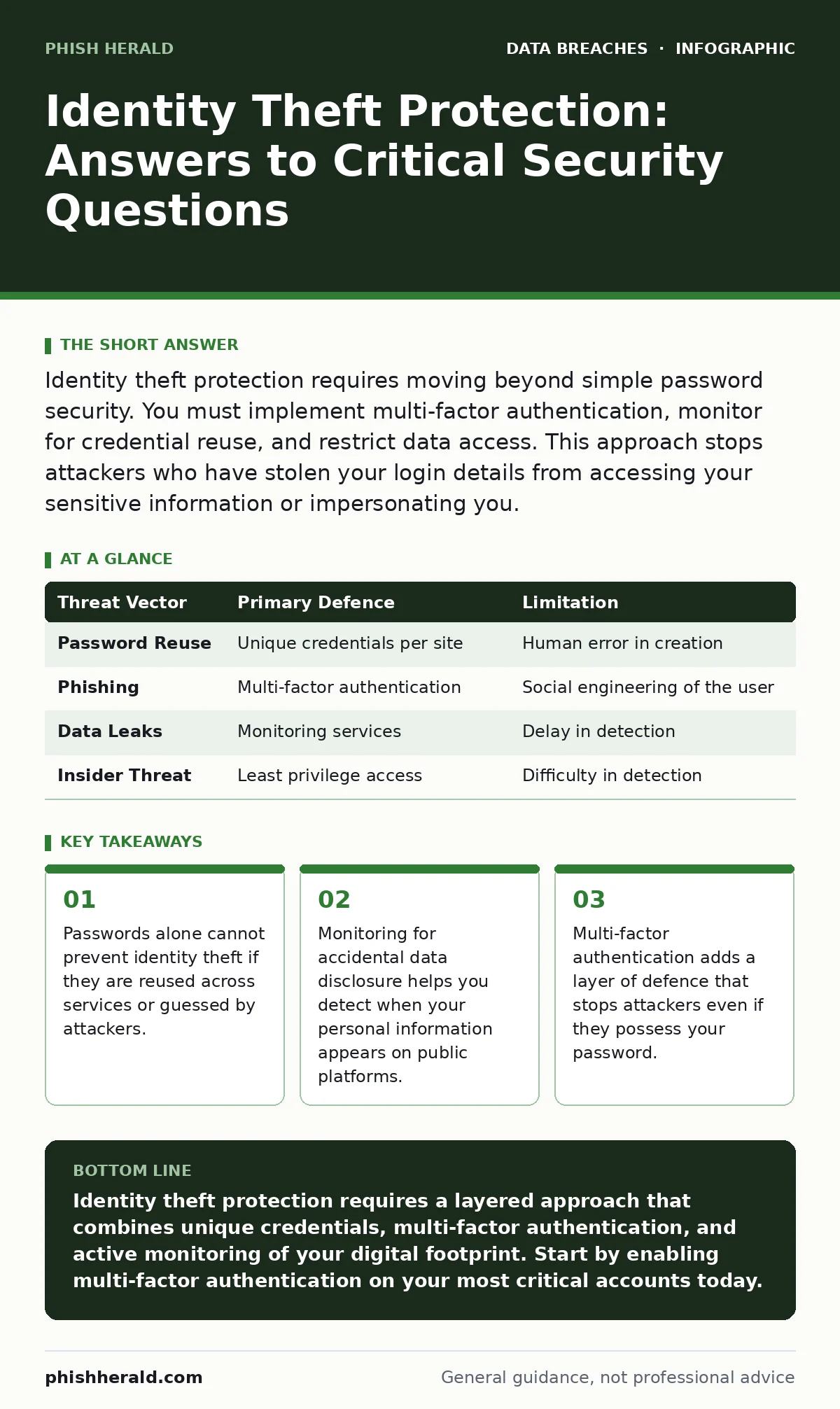
Identity theft protection requires moving beyond simple password security. You must implement multi-factor authentication, monitor for credential reuse, and restrict data access. This approach stops attackers who have stolen your login details from accessing your sensitive information or impersonating you.
What is identity theft protection in technical terms?
Identity theft protection is the set of controls that prevent unauthorised actors from assuming your digital persona. It is not merely about keeping your password secret. It involves verifying that the person requesting access is who they claim to be and that they have the right to perform the action. This distinction matters because authentication proves identity, while authorisation determines permissions.
Does changing my password stop identity theft?
Changing your password only stops attackers who are using that specific, old credential. It does not help if the attacker has already captured your new password via a keylogger or a phishing site. If you reuse passwords, changing one account’s secret does not protect the others. You must treat every password as potentially compromised and ensure each service uses unique credentials.
How does multi-factor authentication prevent theft?
Multi-factor authentication requires two separate forms of proof before granting access. One factor is something you know, like a password. The second is something you have, such as a hardware token or a mobile device. This breaks the chain of attack because stealing a password alone is insufficient. The attacker also needs physical access to your second factor, which is significantly harder to obtain remotely.
Why do attackers target my personal data?
Attackers collect personal data to bypass security questions and reset procedures. They do not always need your password if they can answer questions about your mother’s maiden name or your first pet. This is why public file share exposure is dangerous; a single misplaced document can provide the answers needed to reset your account credentials. Your personal history becomes a vulnerability if it is easily searchable.
What is the role of data monitoring?
Monitoring detects when your sensitive information appears in unexpected places. This includes checking for your email address on dark web forums or in leaked databases. If you see your data listed, you can act before an attacker uses it. This proactive step is more effective than waiting for a notification from a bank or service provider.
See also: Database Activity Monitoring Checklist: Detect Threats Before Breach
How does third-party access increase risk?
Every service you use stores data about you, creating a chain of potential weaknesses. If a minor vendor suffers a breach, your data is exposed even if your primary systems are secure. This is the core issue behind third-party data breaches. You cannot control the security practices of every company you interact with, but you can limit the amount of personal data you share with them.
What is credential stuffing?
Credential stuffing is an automated attack using stolen username and password pairs from other breaches. Attackers assume you reuse passwords and try these combinations on high-value targets like email or banking sites. This method bypasses traditional brute-force detection because the credentials are valid. Using unique passwords for every service neutralises this threat entirely.
How do I protect against synthetic identity theft?
Synthetic identity theft combines real and fake information to create a new persona. Attackers might use a real Social Security number but a fake name and address. This makes detection difficult because the identity does not exist in traditional credit bureaus. You must monitor for new accounts or credit lines opened in your name, even if the details do not perfectly match your known history.
| Threat Vector | Primary Defence | Limitation |
|---|---|---|
| Password Reuse | Unique credentials per site | Human error in creation |
| Phishing | Multi-factor authentication | Social engineering of the user |
| Data Leaks | Monitoring services | Delay in detection |
| Insider Threat | Least privilege access | Difficulty in detection |
What is the impact of accidental disclosure?
Accidental data disclosure occurs when you or an organisation unintentionally exposes sensitive information. This might happen through a misconfigured cloud storage bucket or a document sent to the wrong recipient. Once your data is public, you cannot make it private again. You must assume that any data you share is permanent and plan your identity protection strategies accordingly.
How does database monitoring help?
Database activity monitoring tracks how data is accessed and moved within an organisation. It alerts administrators to unusual queries or bulk data exports. This helps detect insider threats or compromised accounts that are exfiltrating information. While this is primarily an organisational control, understanding it helps you appreciate why companies are slow to notify you of breaches.
What is the final line of defence?
The final line of defence is limiting the value of your data to attackers. This involves minimising the personal information you share online and regularly reviewing your privacy settings. If an attacker cannot find enough data to impersonate you, their effort becomes not worthwhile. This reduces your attack surface and makes you a less attractive target.
Key takeaways
- Passwords alone cannot prevent identity theft if they are reused across services or guessed by attackers.
- Monitoring for accidental data disclosure helps you detect when your personal information appears on public platforms.
- Multi-factor authentication adds a layer of defence that stops attackers even if they possess your password.
Identity theft protection requires a layered approach that combines unique credentials, multi-factor authentication, and active monitoring of your digital footprint. Start by enabling multi-factor authentication on your most critical accounts today.
Frequently asked questions
Can I trust password managers to protect my identity?
Password managers help you create and store unique passwords for every site, reducing the risk of reuse. They do not protect you if the attacker compromises your master password or your device.
How do I know if my identity has been stolen?
Look for unauthorised transactions, new accounts you did not open, or missed bill payments. Regularly reviewing your financial statements and credit reports is the most reliable method.
Is two-factor authentication the same as multi-factor?
Two-factor authentication is a specific type of multi-factor authentication that uses exactly two factors. Multi-factor authentication can use two or more factors, providing greater security.
What should I do if I find my data on the dark web?
Change the passwords for any accounts associated with that data immediately. Enable multi-factor authentication on those accounts and monitor them for suspicious activity.
How this guide was produced: written by the Phish Herald editorial team with AI assistance, checked against the public references listed below, and reviewed when the facts change. See our editorial policy or report an error.