Cloud Backup vs Cloud Sync: The Critical Difference for Data Safety
Cloud sync mirrors files in real time, meaning a ransomware infection or accidental deletion wipes the cloud copy instantly, whereas backup retains historical versions.
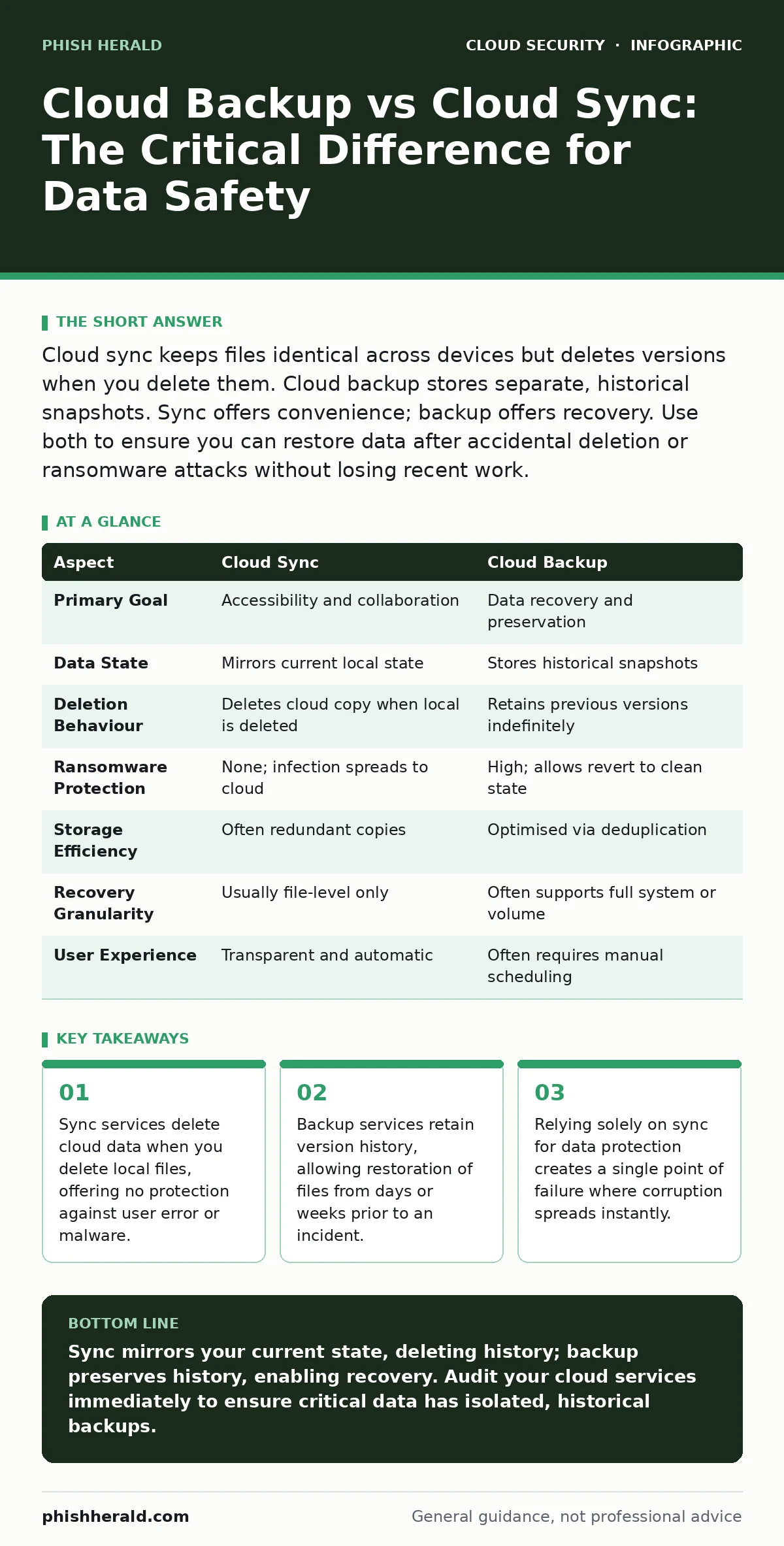
Cloud sync keeps files identical across devices but deletes versions when you delete them. Cloud backup stores separate, historical snapshots. Sync offers convenience; backup offers recovery. Use both to ensure you can restore data after accidental deletion or ransomware attacks without losing recent work.
The Fundamental Distinction
Cloud sync and cloud backup serve entirely different purposes, yet users frequently confuse them due to similar interface designs. Sync services mirror your local files to the cloud in real time. If you delete a file on your laptop, it vanishes from the cloud storage immediately. Backup services create separate copies of your data at specific intervals. If you delete a local file, the backup retains the previous version, allowing you to restore it later. Confusing these mechanisms leaves your organisation vulnerable to data loss.
How Cloud Sync Operates
Sync services focus on accessibility and collaboration. They maintain an identical state across all connected devices. When you modify a document on your desktop, the change propagates to your mobile device and the cloud storage within seconds. This mechanism is ideal for active workflows where multiple users need the latest version of a file. However, this immediacy is also its greatest weakness. The service does not distinguish between a legitimate edit and a malicious overwrite.
How Cloud Backup Operates
Backup services prioritise data preservation over immediate access. They capture the state of your data at a specific point in time. These snapshots are stored separately from your active working files. If your primary storage fails, or if ransomware encrypts your live data, you can revert to a clean snapshot from before the incident. Backup solutions often include deduplication, which reduces storage costs by storing only the changes between snapshots. This ensures efficient use of resources without compromising recovery capabilities.
Point-by-Point Comparison
| Aspect | Cloud Sync | Cloud Backup |
|---|---|---|
| Primary Goal | Accessibility and collaboration | Data recovery and preservation |
| Data State | Mirrors current local state | Stores historical snapshots |
| Deletion Behaviour | Deletes cloud copy when local is deleted | Retains previous versions indefinitely |
| Ransomware Protection | None; infection spreads to cloud | High; allows revert to clean state |
| Storage Efficiency | Often redundant copies | Optimised via deduplication |
| Recovery Granularity | Usually file-level only | Often supports full system or volume |
| User Experience | Transparent and automatic | Often requires manual scheduling |
Where the Mechanisms Overlap
Modern cloud platforms often bundle sync and backup features, blurring the lines. Some sync services offer limited version history, keeping the last thirty versions of a file. This provides a modest safety net for accidental edits. However, this is not a true backup. It lacks the isolation required to protect against systemic failures. Furthermore, some backup tools offer selective sync, allowing you to access backed-up files without downloading them fully. This overlap can create a false sense of security. You must verify whether your service truly isolates backup data from the active sync environment.
See also: Stop Exposed Storage Buckets: 3 Cloud Security Fixes That Work · Cloud Data Exfiltration: 6 Myths That Leave Your Assets Vulnerable
Choosing the Right Strategy
Your choice depends on the criticality of the data and the threat model. Sync is for active work. Backup is for insurance. You should never rely on sync alone for compliance or disaster recovery. The convenience of instant access does not outweigh the risk of permanent data loss.
- Choose cloud sync when:
- You need real-time collaboration across multiple devices.
- The data is non-critical or easily regenerated.
- You require immediate access to files from any location.
- You have separate backup measures in place.
- Choose cloud backup when:
- You need to comply with data retention regulations.
- You must protect against ransomware or accidental deletion.
- The data is irreplaceable or has high business value.
- You require point-in-time recovery capabilities.
Integrating with Broader Security
Relying on sync for protection is a common mistake. It leaves you exposed to insecure cloud APIs that might allow unauthorised access to your mirrored data. If your identity credentials are compromised, an attacker can delete or encrypt your synced files, and the change propagates instantly. This is why identity sprawl management is critical. You must ensure that access to your cloud storage is tightly controlled.
Furthermore, consider bring your own key encryption. This allows you to manage the encryption keys for your backup data. If you lose access to the cloud provider, you can still recover your data. This adds a layer of control that sync services rarely offer. For organisations using complex infrastructure, cloud-native application protection platforms (CNAPP) can help monitor both sync and backup configurations for misconfigurations.
Addressing Common Misconceptions
Many believe that cloud storage is inherently secure. This is incorrect. The cloud is just another server. If you do not back up your data, you are vulnerable to the same risks as on-premise storage. Additionally, some users think that version history in sync services is sufficient. It is not. Version history is often limited in duration and may not cover all file types. True backup requires isolated, immutable copies.
Another misconception is that backup is too slow or cumbersome. Modern backup solutions are incremental, meaning they only transfer changed data. This minimises bandwidth usage and time. You can schedule backups to run during off-peak hours. The slight delay in recovery time is a small price to pay for guaranteed data integrity.
Final Considerations
You must audit your current cloud usage. Identify which services are for sync and which are for backup. Ensure that your critical data is protected by a dedicated backup solution. Do not let convenience override security. The difference between sync and backup is the difference between convenience and survival.
Key takeaways
- Sync services delete cloud data when you delete local files, offering no protection against user error or malware.
- Backup services retain version history, allowing restoration of files from days or weeks prior to an incident.
- Relying solely on sync for data protection creates a single point of failure where corruption spreads instantly.
Sync mirrors your current state, deleting history; backup preserves history, enabling recovery. Audit your cloud services immediately to ensure critical data has isolated, historical backups.
Frequently asked questions
Can I use OneDrive or Google Drive as a backup?
These are primarily sync services. While they offer limited version history, they do not provide isolated, immutable backups. Use them for collaboration, but supplement with a dedicated backup solution for critical data.
How often should I back up my data?
This depends on your recovery point objective. For critical business data, daily or even hourly backups are recommended. For less critical data, weekly backups may suffice. Test your restoration process regularly.
Does cloud backup protect against ransomware?
Yes, if the backup is isolated and immutable. Ransomware cannot encrypt data it cannot access. Ensure your backup solution supports immutable storage or air-gapping to prevent attackers from deleting or encrypting backup copies.
What is the difference between local and cloud backup?
Local backup stores data on physical devices like hard drives. Cloud backup stores data on remote servers. Cloud backup offers off-site protection against physical disasters like fire or theft. Local backup offers faster recovery speeds. A hybrid approach is often best.
How this guide was produced: written by the Phish Herald editorial team with AI assistance, checked against the public references listed below, and reviewed when the facts change. See our editorial policy or report an error.