Malware Analysis Best Practices: Seven Steps for Safe Dissection
Static analysis misses the mark when malware sleeps until execution; combining behavioural observation with automated sandboxes reveals the true intent of modern threats.

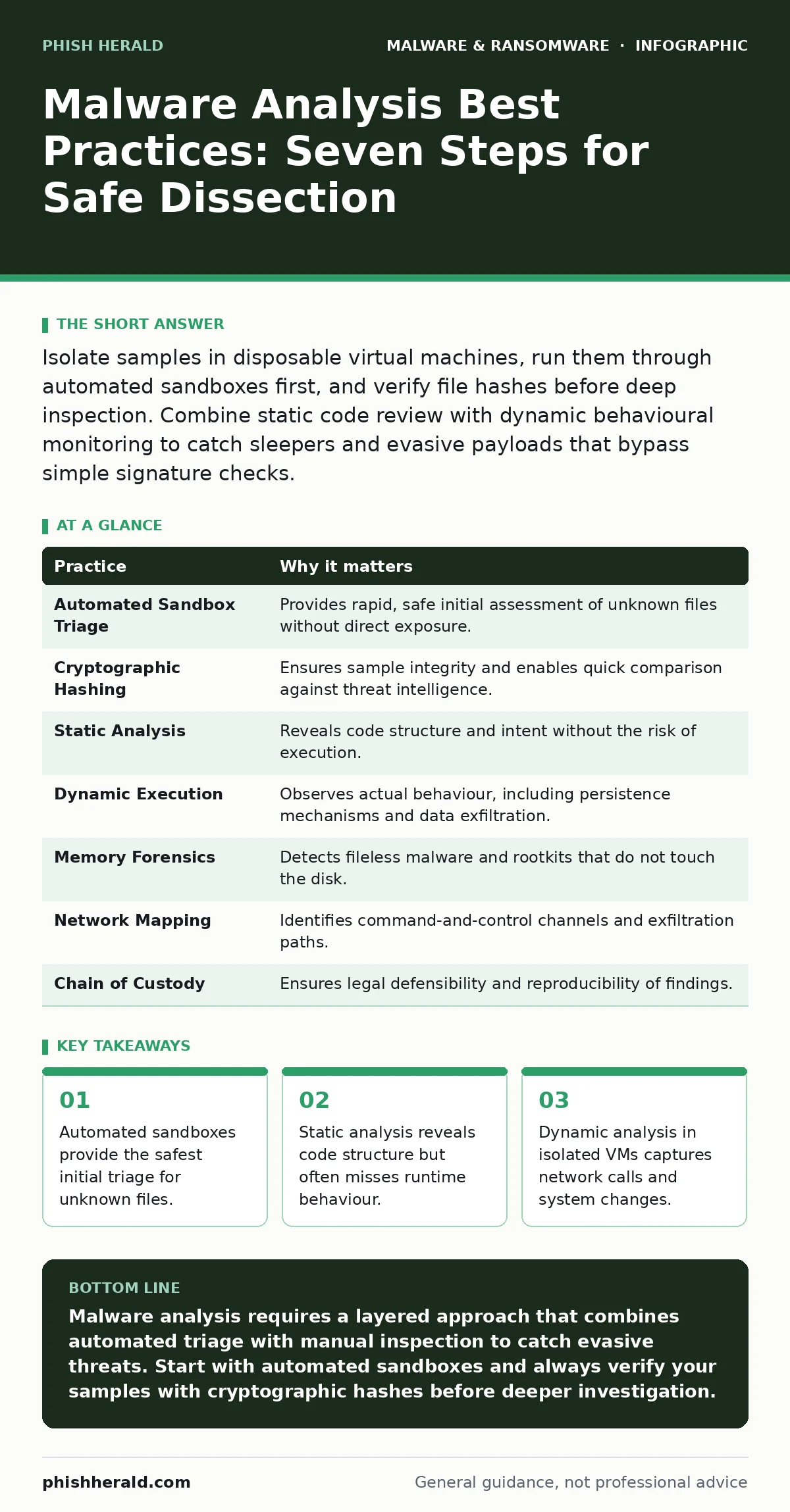
Isolate samples in disposable virtual machines, run them through automated sandboxes first, and verify file hashes before deep inspection. Combine static code review with dynamic behavioural monitoring to catch sleepers and evasive payloads that bypass simple signature checks.
1. Prioritise Automated Sandbox Triage
You should never open a suspicious file on a production host or even a standard analysis workstation. The first step is to submit the sample to an automated sandbox. These systems execute the malware in a disposable, isolated environment and report on file system changes, registry modifications and network connections. This gives you a high-level view of the threat without exposing your primary tools to direct infection.
Automated analysis is fast and scales well, but it is not infallible. Sophisticated malware can detect sandbox environments and remain dormant. You must treat the output as a hypothesis, not a final verdict. If the sandbox flags nothing, do not assume the file is benign. It may simply be waiting for specific conditions to trigger its payload.
2. Verify Integrity with Cryptographic Hashes
Before you move the file to any analysis tool, you must calculate its cryptographic hash. This unique string of characters identifies the exact binary content of the file. If you change even one bit, the hash changes completely. You record this hash in your incident log immediately. This step proves that the file you are analysing is the same file that was intercepted on the network or submitted by a user.
This practice prevents sample swapping errors, which can occur when multiple incidents are handled simultaneously. It also allows you to check public threat intelligence databases for known indicators of compromise. If the hash matches a known benign file, you can stop immediately. If it matches known malware, you skip to containment. If it is new, you proceed with caution.
3. Perform Static Analysis in Isolation
Static analysis involves examining the file without executing it. You use disassemblers and decompilers to read the machine code and reconstruct the logic. This reveals the structure of the malware, such as embedded strings, imported libraries and resource sections. You look for obfuscation techniques, packed binaries or unusual header information that suggests the file is hiding something.
This method is safe because the code never runs. However, it requires significant expertise to interpret correctly. You may see strings that look like command-line arguments or URLs, which are strong indicators of malicious intent. Static analysis helps you understand what the malware can do, but it cannot tell you what it will do when the environment is complex or dynamic.
4. Execute in a Controlled Dynamic Environment
Dynamic analysis requires running the malware to observe its behaviour. You must use a dedicated virtual machine that is completely air-gapped from the corporate network. This machine should have no shared folders, no host-only networking and no internet access unless you are specifically monitoring traffic through a controlled proxy. You snapshot the machine state before execution so you can revert to a clean state instantly.
You monitor the system for registry changes, process creation and file drops. Tools like Process Monitor and Wireshark help you track these activities in real time. This reveals the malware's true goals, such as stealing credentials or establishing persistence. You are looking for the "why" behind the code, not just the "what".
5. Analyse Memory for Fileless Techniques
Modern malware often operates entirely in memory to avoid detection on disk. This technique, known as fileless malware, injects code into legitimate processes like System or Explorer. Traditional file-based scanners miss these threats because there is no malicious file to inspect. You must dump the memory of the suspect process and analyse the raw data.
Memory forensics tools allow you to search for patterns of injected code, hidden threads and allocated memory regions that do not belong to the legitimate process. This is particularly relevant when investigating rootkits, which are designed to hide their presence from the operating system. By examining the memory directly, you bypass the operating system's own hiding mechanisms.
See also: Account Takeover Fraud Detection: Signals That Beat Automated Attacks
6. Map the Network Communication
Malware rarely acts alone. It needs to contact a command-and-control server to receive instructions or exfiltrate data. You must capture all network traffic during dynamic analysis. Analyse the DNS queries, HTTP headers and SSL/TLS connections. Look for domain generation algorithms, which create random-looking domain names to avoid blacklisting.
You also examine the payload of the packets. Even if the traffic is encrypted, metadata such as the size and timing of packets can reveal patterns. This helps you identify the infrastructure behind the attack. Understanding the communication channel allows you to block not just the current malware, but any other variants using the same infrastructure.
7. Document the Chain of Custody
Every action you take must be logged. This includes who accessed the sample, when it was moved, what tools were used and what results were obtained. This chain of custody is vital for legal proceedings and internal audits. It ensures that your analysis is reproducible and defensible. If you cannot prove how you reached your conclusion, your findings hold no weight.
This documentation also helps with knowledge transfer. If you leave the organisation, the next analyst must be able to pick up where you left off. Clear notes on the environment setup, tool versions and specific commands used save hours of reconstruction time. It turns a personal investigation into an organisational asset.
| Practice | Why it matters |
|---|---|
| Automated Sandbox Triage | Provides rapid, safe initial assessment of unknown files without direct exposure. |
| Cryptographic Hashing | Ensures sample integrity and enables quick comparison against threat intelligence. |
| Static Analysis | Reveals code structure and intent without the risk of execution. |
| Dynamic Execution | Observes actual behaviour, including persistence mechanisms and data exfiltration. |
| Memory Forensics | Detects fileless malware and rootkits that do not touch the disk. |
| Network Mapping | Identifies command-and-control channels and exfiltration paths. |
| Chain of Custody | Ensures legal defensibility and reproducibility of findings. |
8. Correlate with Endpoint Detection Data
Your analysis does not exist in a vacuum. You must correlate your findings with data from endpoint detection and response (EDR) systems. These tools provide a timeline of events across the organisation. By matching the hashes and network indicators from your analysis with EDR alerts, you can determine the scope of the infection.
This correlation helps you identify other infected hosts that may have been missed. It also validates your analysis. If the EDR data shows the same behaviour you observed in the sandbox, your confidence in the findings increases. This step bridges the gap between deep technical analysis and operational response.
9. Dispose of Samples Securely
After analysis is complete, you must dispose of the malware sample securely. Simply deleting it is not enough. You must wipe the storage media or use cryptographic shredding to ensure the data cannot be recovered. This prevents accidental leakage of the sample to unauthorised parties.
You also reset the analysis environment. Delete snapshots, clear logs and reinstall the operating system on the virtual machine. This ensures that no residual traces of the malware remain for the next analysis. Security is a cycle, not a single event. Proper disposal closes the loop.
Key takeaways
- Automated sandboxes provide the safest initial triage for unknown files.
- Static analysis reveals code structure but often misses runtime behaviour.
- Dynamic analysis in isolated VMs captures network calls and system changes.
- Memory forensics detects fileless malware that never touches the disk.
Malware analysis requires a layered approach that combines automated triage with manual inspection to catch evasive threats. Start with automated sandboxes and always verify your samples with cryptographic hashes before deeper investigation.
Frequently asked questions
Can I analyse malware on my primary work computer?
No, you must use a completely isolated environment. Analysing malware on a primary computer risks infecting your entire network and compromising sensitive data.
How do I know if a sandbox missed the malware?
If the sandbox reports no activity but you have strong indicators of compromise, proceed with caution. Perform static analysis and dynamic testing in a more controlled, air-gapped environment.
What is the difference between static and dynamic analysis?
Static analysis examines the code without running it, while dynamic analysis executes the malware to observe its behaviour in a controlled environment.
Do I need special software to dump memory?
Yes, standard operating system tools do not provide full memory dumps. You need specialised forensic tools that can capture the raw memory state of a process or system.
How this guide was produced: written by the Phish Herald editorial team with AI assistance, checked against the public references listed below, and reviewed when the facts change. See our editorial policy or report an error.