Spot Business Email Compromise: Hidden Signs and Immediate Response
Most detection fails because attackers mimic behaviour, not just addresses, so you must verify context rather than relying on surface-level email headers.

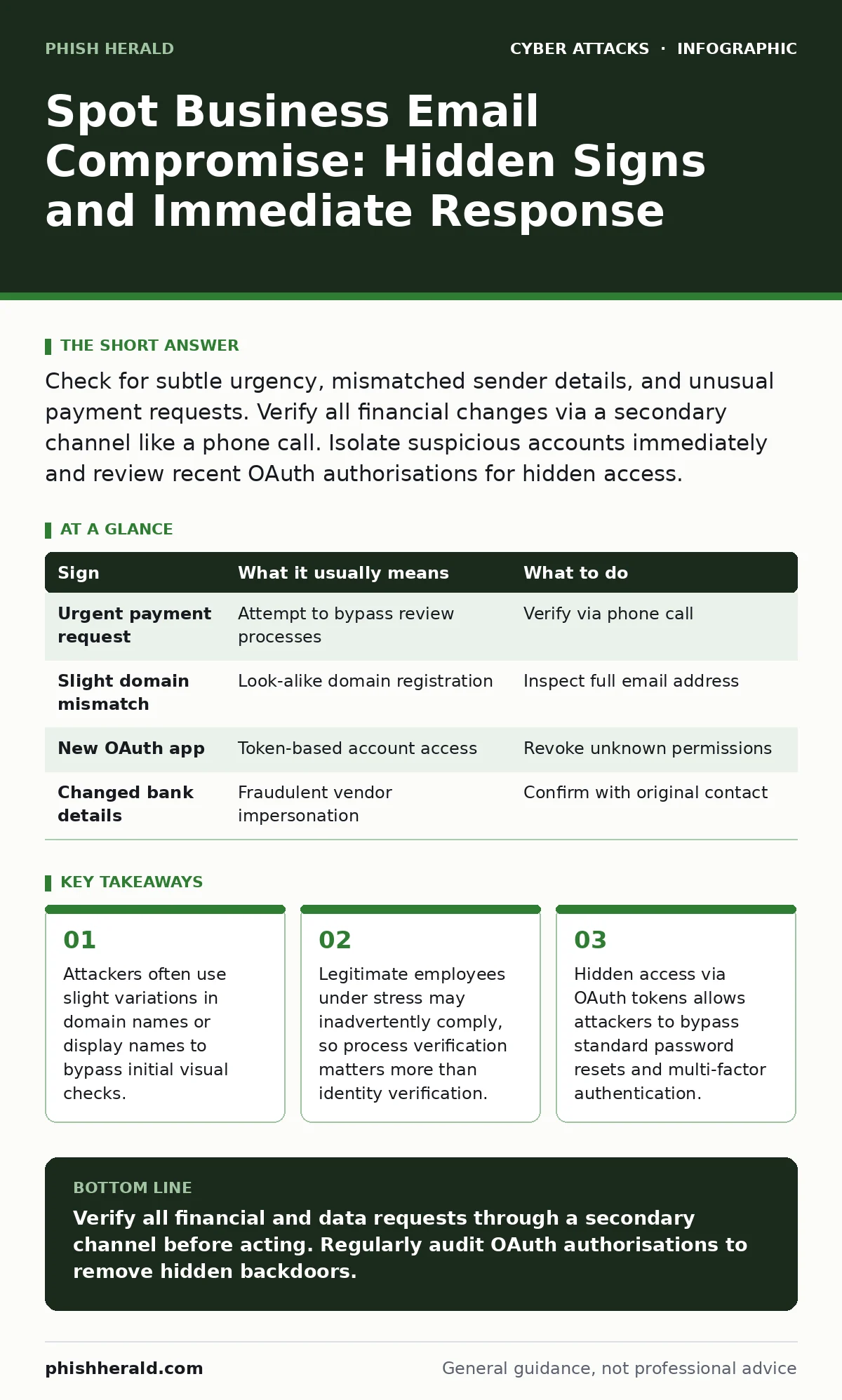
Check for subtle urgency, mismatched sender details, and unusual payment requests. Verify all financial changes via a secondary channel like a phone call. Isolate suspicious accounts immediately and review recent OAuth authorisations for hidden access.
The Illusion of Familiarity
Business email compromise relies on social engineering rather than technical exploitation. The attacker does not break into your system; they convince you to move money or data. You see an email that looks like it comes from a trusted colleague or vendor. The signature matches, the tone is appropriate, and the request seems reasonable. This is the core mechanism of the attack. It exploits the natural trust you place in established relationships.
The first sign is often a sense of urgency. The sender asks for immediate action, perhaps a wire transfer or a gift card purchase. They cite a tight deadline or a confidential matter. This pressure reduces the time you have to think critically. It pushes you to skip standard verification steps. You must recognise that urgency is a tool used to bypass your internal controls.
Subtle Domain Variations
Attackers frequently register domains that look identical to legitimate ones at a glance. They might swap a letter for a similar character, such as using an 'i' instead of an 'l'. Or they might add a hyphen or a common word like 'support' or 'secure'. These are known as look-alike domains. Your email client may not flag them as malicious because they are technically valid addresses.
You must inspect the full email address, not just the display name. The display name is easily spoofed. The actual address is harder to fake without owning the domain. Even then, the domain itself may be a close imitation. This technique is closely related to domain spoofing, where the attacker manipulates headers to appear as a trusted source. You need to train your eye to spot these minor discrepancies.
The Hidden Threat of OAuth Tokens
A less obvious sign is activity that occurs without a password change. Attackers may have gained access through OAuth consent phishing. This involves tricking you into granting an application access to your email. Once granted, the attacker can read emails, send messages, and delete traces. This access persists even if you change your password.
You might notice new applications listed in your account security settings. These are authorisations you did not initiate. They act as a backdoor. Standard password resets do not remove these tokens. You must revoke unknown authorisations manually. This is why checking application permissions is as important as checking your inbox.
Contextual Red Flags
Sometimes the email itself looks perfect. The domain is correct, and the sender is legitimate. The attack then shifts to the content. Look for requests that deviate from standard procedure. A vendor asking to change bank details is a major red flag. A colleague asking for sensitive data via email instead of a secure portal is another.
These requests often lack the usual corporate formatting or references. They may omit project codes or ticket numbers. The attacker may not know your internal processes. This disconnect is a clue. You should verify any change in payment or data handling procedures through a separate communication channel. This aligns with best practices for preventing initial access via social engineering.
Verification Protocols
When you spot a potential compromise, you must act quickly but calmly. Do not reply to the email. Instead, contact the purported sender using a known, trusted number. This is out-of-band verification. It confirms whether the request is genuine. If you cannot reach them, assume the request is fraudulent.
You should also check for other signs of account takeover. Look for forwarded rules in the email client. Attackers often set these up to hide their activity. Delete any unfamiliar rules immediately. This step is critical in stopping the spread of the compromise.
| Sign | What it usually means | What to do |
|---|---|---|
| Urgent payment request | Attempt to bypass review processes | Verify via phone call |
| Slight domain mismatch | Look-alike domain registration | Inspect full email address |
| New OAuth app | Token-based account access | Revoke unknown permissions |
| Changed bank details | Fraudulent vendor impersonation | Confirm with original contact |
See also: HTML Smuggling Explained: How Malware Bypasses Email Filters · Why are gift cards used in scams: mechanics and mitigation
Immediate Containment Steps
If you confirm a compromise, isolate the affected account. Change the password and enable multi-factor authentication if it is not already on. However, remember that this does not remove existing OAuth tokens. You must revoke all active sessions and third-party app access.
Notify your security team immediately. They can scan for other compromised accounts. They may also need to review account lockout policies to ensure they are not being abused. Quick containment limits the damage. It prevents the attacker from moving laterally within your network.
Long-Term Defence Strategies
Prevention requires more than just better filters. You need a culture of verification. Train staff to question unusual requests. Implement dual approval for financial transactions. This adds a layer of human oversight.
Regularly audit your email security settings. Ensure that sender policy framework records are correctly configured. This helps block obvious spoofing. Stay informed about new tactics, such as HTML smuggling, which hides malicious payloads in email bodies. Continuous improvement is necessary as attackers evolve.
Key takeaways
- Attackers often use slight variations in domain names or display names to bypass initial visual checks.
- Legitimate employees under stress may inadvertently comply, so process verification matters more than identity verification.
- Hidden access via OAuth tokens allows attackers to bypass standard password resets and multi-factor authentication.
Verify all financial and data requests through a secondary channel before acting. Regularly audit OAuth authorisations to remove hidden backdoors.
Frequently asked questions
How do I know if my email is compromised?
Check for unfamiliar sent items, deleted emails, or new forwarding rules. Look for unknown applications in your security settings.
Can I trust emails from known contacts?
No. Attackers can compromise legitimate accounts. Always verify unusual requests via a separate communication method.
What is OAuth consent phishing?
It is a trick that convinces you to grant an app access to your email. This allows the attacker to read and send emails without your password.
Should I block all external emails?
No. This disrupts business. Instead, use strict verification processes for requests involving money or sensitive data.
How this guide was produced: written by the Phish Herald editorial team with AI assistance, checked against the public references listed below, and reviewed when the facts change. See our editorial policy or report an error.