How Whaling Attacks Work: The Step-by-Step Mechanics
Whaling succeeds not through technical brilliance, but by exploiting the natural deference organisations pay to authority figures and established communication patterns.

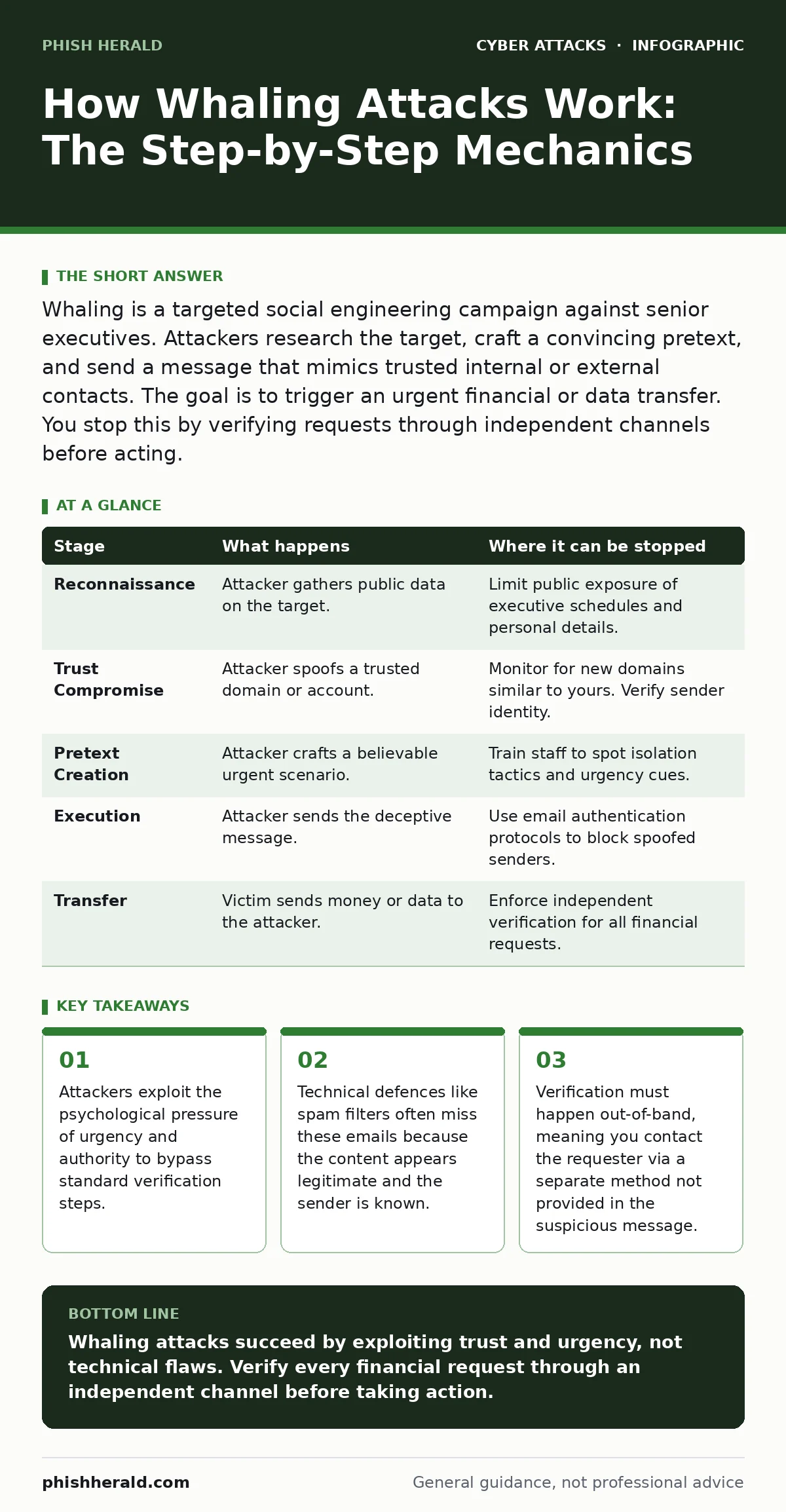
Whaling is a targeted social engineering campaign against senior executives. Attackers research the target, craft a convincing pretext, and send a message that mimics trusted internal or external contacts. The goal is to trigger an urgent financial or data transfer. You stop this by verifying requests through independent channels before acting.
The Psychology of Authority and Urgency
Whaling differs from broad phishing because it targets individuals with high authority and significant decision-making power. The attacker relies on the cultural norm that senior leaders are trusted implicitly by their staff. This trust creates a blind spot. When a message appears to come from a CEO or a board member, recipients often skip standard security checks to avoid appearing obstructive or slow.
The mechanism exploits cognitive bias. Humans are wired to respond quickly to perceived authority and urgent requests. An attacker crafts a message that triggers this response. The message usually demands immediate action, such as transferring funds or releasing sensitive data. The urgency prevents the recipient from thinking critically. The recipient acts on emotion rather than procedure. This psychological bypass is the core of the attack.
Reconnaissance and Profile Building
Before any contact is made, the attacker gathers extensive information about the target. This stage is silent and relies on public data. Attackers review social media profiles, press releases, and company websites. They look for the target’s schedule, travel plans, and personal interests. They identify key relationships, such as lawyers, accountants, or family members.
This research allows the attacker to mimic the target’s voice and context. They note specific vocabulary, tone, and formatting habits. They might discover that the target recently changed job titles or is attending a specific conference. This detail adds credibility to the future message. The deeper the research, the more convincing the deception. A generic greeting fails here. A message referencing a shared recent event succeeds.
Compromising Trust Anchors
The attacker needs a way to deliver the message that looks legitimate. They often do not hack the target’s actual email account. Instead, they compromise a trusted third party. This could be a law firm, an accountant, or a vendor. The attacker sends a spoofed message from this trusted entity to the executive.
Alternatively, the attacker registers a domain name that looks similar to the target’s company. This is called domain impersonation. The domain might differ by only one character. Email filters often allow this through because the domain is new and has not been flagged as malicious. The attacker then sends the message from this look-alike address. The recipient sees a familiar name and assumes the address is correct.
Crafting the Pretext
The message itself is the weapon. It must align with the target’s current reality. The attacker creates a scenario that explains why the request is urgent and why normal procedures are bypassed. Common pretexts include legal deadlines, tax filings, or confidential mergers. The message often claims that the matter is highly sensitive and must not be discussed with others.
This isolation tactic prevents the target from consulting colleagues. The message might say, "Do not forward this email." It creates a secret channel between the attacker and the victim. The content is carefully written to match the target’s professional style. It avoids complex technical jargon that might raise suspicion. It uses clear, direct language that demands a specific action. The request seems reasonable within the fabricated context.
Execution and Delivery
The attacker sends the message at a time when the target is likely to be busy or distracted. This reduces the chance of careful scrutiny. The message might arrive during a meeting or while the target is travelling. The subject line is designed to grab attention immediately. It might reference a pending legal matter or a critical financial deadline.
The body of the message contains the malicious instruction. This is often a request to wire money or change bank details. Sometimes it includes a link to a fake document. The link leads to a page that looks like a legitimate internal portal. The page asks for credentials or confirms the payment. The attacker waits for the response. If the target complies, the attacker moves quickly to execute the fraud.
See also: Domain Spoofing Explained: How Fake Addresses Bypass Your Defences · HTML Smuggling Explained: How Malware Bypasses Email Filters
The Financial or Data Transfer
Once the target agrees to the request, the attacker facilitates the transfer. If the request was for money, the attacker provides bank details for an account they control. These accounts are often in jurisdictions with weak financial oversight. The funds are moved quickly through multiple accounts to obscure the trail. This is known as smurfing.
If the request was for data, the attacker provides a cloud storage link. The target uploads the sensitive files. The attacker then downloads and encrypts the data. They may threaten to release it unless a ransom is paid. In both cases, the damage is done. The target realises the mistake only after the funds are gone or the data is stolen. The speed of the transfer limits recovery options.
| Stage | What happens | Where it can be stopped |
|---|---|---|
| Reconnaissance | Attacker gathers public data on the target. | Limit public exposure of executive schedules and personal details. |
| Trust Compromise | Attacker spoofs a trusted domain or account. | Monitor for new domains similar to yours. Verify sender identity. |
| Pretext Creation | Attacker crafts a believable urgent scenario. | Train staff to spot isolation tactics and urgency cues. |
| Execution | Attacker sends the deceptive message. | Use email authentication protocols to block spoofed senders. |
| Transfer | Victim sends money or data to the attacker. | Enforce independent verification for all financial requests. |
Interrupting the Chain
You can stop a whaling attack at any stage, but the most effective point is before the transfer. Technical controls help, but human verification is key. Implement a policy that requires all financial requests to be verified through a separate channel. This means calling the requester using a known, trusted phone number. Do not use the number in the email.
Email authentication protocols also provide a layer of defence. These protocols verify that the sender is who they claim to be. They prevent attackers from easily spoofing your domain. However, they do not stop attacks from external trusted parties. Therefore, you must combine technical measures with procedural checks. Regular training helps staff recognise the signs of social engineering.
The Hidden Cost of Speed
Organisations often prioritise speed over security in executive communications. This culture is a hidden vulnerability. When leaders are expected to act fast, security checks are seen as obstacles. Attackers exploit this expectation. They frame their requests as time-sensitive to force compliance.
To counter this, you must redefine urgency. Establish clear procedures for handling urgent requests. These procedures should include mandatory verification steps. Make it safe for staff to question authority. If an employee hesitates, they should not be penalised. Encourage a culture where double-checking is standard practice. This reduces the pressure to act impulsively.
Key takeaways
- Attackers exploit the psychological pressure of urgency and authority to bypass standard verification steps.
- Technical defences like spam filters often miss these emails because the content appears legitimate and the sender is known.
- Verification must happen out-of-band, meaning you contact the requester via a separate method not provided in the suspicious message.
Whaling attacks succeed by exploiting trust and urgency, not technical flaws. Verify every financial request through an independent channel before taking action.
Frequently asked questions
Can email filters stop whaling attacks?
Email filters can block obvious spam, but they often miss whaling attacks because the content appears legitimate and the sender is known. Human verification is still required.
Why do executives fall for these scams?
Executives fall for these scams because attackers exploit the psychological pressure of authority and urgency. The target is often isolated and expected to act quickly.
Is this similar to business email compromise?
Yes, whaling is a specific type of business email compromise that targets senior executives. The tactics are similar, but the level of personalisation and research is higher.
How do I verify a request safely?
Contact the requester using a phone number or email address you already have on file. Do not use the contact details provided in the suspicious message.
How this guide was produced: written by the Phish Herald editorial team with AI assistance, checked against the public references listed below, and reviewed when the facts change. See our editorial policy or report an error.